
Build Confidence with Everyday Office Automation Skills
Modern workplaces rely on digital tools to create documents, manage data, prepare presentations, and improve productivity. This interactive 2-hour workshop introduces the fundamentals of Office Automation through practical demonstrations, helping you use essential office applications with greater confidence and efficiency.
Register Now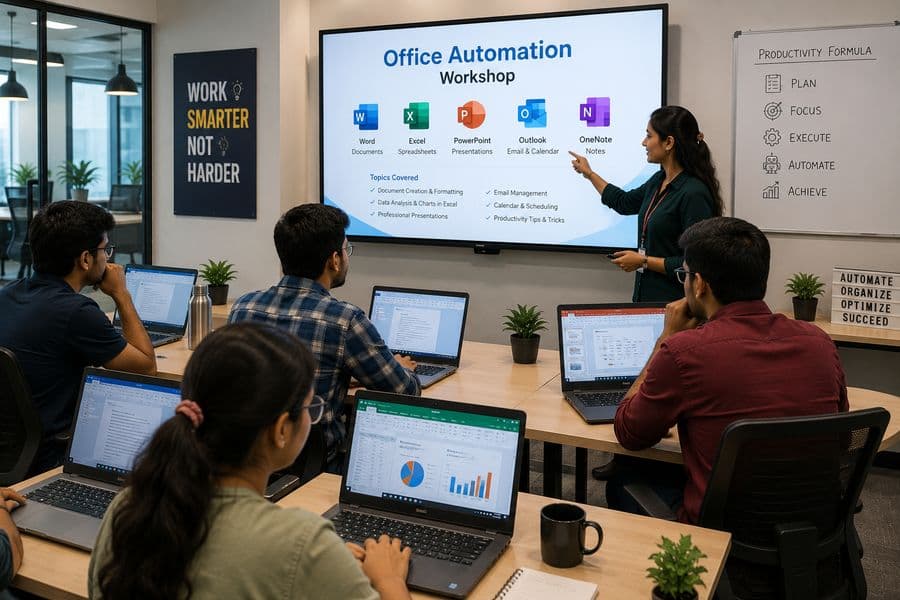

Duration
2 Hours

Learning Format
Online | Offline | Hybrid

Experience Level
Beginner Friendly

Recognition
Certificate of Participation
Duration
2 Hours
Learning Format
Online | Offline | Hybrid
Experience Level
Beginner Friendly
Recognition
Certificate of Participation
Work Smarter with Essential Office Tools
Office Automation refers to the use of digital tools and applications to create, organise, process, store, and share information efficiently. It helps simplify routine workplace tasks by improving accuracy, reducing manual effort, and saving time.
This workshop introduces how office tools work together for everyday tasks such as creating documents, managing data in spreadsheets, preparing presentations, communicating through email, organising files, and collaborating digitally. Through practical examples, you will learn how features, templates, shortcuts, and automation options can improve productivity in academic and professional environments.
Why Office Automation Skills Matter Today
Digital productivity skills are required across administration, education, finance, sales, healthcare, business, and many other sectors. Knowing how to use office applications confidently can help you complete tasks faster, present information more professionally, and manage everyday responsibilities with fewer errors.
Benefits of Attending
Understand the role of Office Automation in modern workplaces
Create and format professional documents
Organise and calculate data using spreadsheets
Prepare clear and visually structured presentations
Manage files, folders, emails, and schedules efficiently
Explore useful shortcuts, templates, and automation features
Improve accuracy, organisation, and workplace productivity
Interact directly with the trainer during the session

A Practical Introduction to Digital Office Work
This workshop combines clear explanations, real workplace examples, and live demonstrations to show how office applications support different tasks.
Document Creation
- Letters and official communication
- Reports and notices
- Résumés and applications
- Tables and structured information
- Page layouts and formatting
- Headers, footers, and page numbers
Spreadsheet Management
- Entering and formatting information
- Basic formulas and calculations
- Sorting and filtering data
- Creating attendance and expense sheets
- Preparing tables and summaries
- Converting data into charts
Presentation Design
- Planning slide content
- Choosing layouts and themes
- Adding images, icons, and charts
- Applying transitions appropriately
- Presenting ideas clearly
- Avoiding overcrowded slides
Digital Communication and Organisation
- Writing professional emails
- Managing attachments
- Organising inboxes and folders
- Scheduling meetings
- Using calendars and reminders
- Sharing files through cloud platforms
Smarter Office Work
- Keyboard shortcuts
- Reusable templates
- Mail merge fundamentals
- Online forms
- Collaborative editing
- Basic workflow automation
Welcome and Introduction to Office Automation
Documents and Professional Formatting
Spreadsheet Basics, Formulas, and Data Organisation
Presentation Design and Visual Communication
Email, Calendar, File, and Cloud Management
Live Productivity and Automation Demonstrations
Interactive Q&A
Certificate and Next Steps
| Duration | Session |
|---|---|
| 10 Minutes | Welcome and Introduction to Office Automation |
| 20 Minutes | Documents and Professional Formatting |
| 25 Minutes | Spreadsheet Basics, Formulas, and Data Organisation |
| 20 Minutes | Presentation Design and Visual Communication |
| 20 Minutes | Email, Calendar, File, and Cloud Management |
| 15 Minutes | Live Productivity and Automation Demonstrations |
| 10 Minutes | Interactive Q&A |
| Final | Certificate and Next Steps |
Experience Office Automation in Action
Watch everyday office tasks being completed in a faster, clearer, and more professional way.
During the live demonstrations, you may see how to:
Format a Professional Document
Create a Working Spreadsheet
Turn Data into a Chart
Design a Professional Presentation
Personalise Documents Efficiently
Organise Digital Files
Collaborate Online
These demonstrations show how everyday office tasks can be completed faster and more professionally.
Office Automation Across Different Industries
Practical applications across different work environments.
Administration
Create official documents, maintain records, schedule meetings, and manage correspondence.
Finance and Accounting
Prepare budgets, calculate expenses, organise transactions, and generate financial summaries.
Education
Manage attendance, prepare lesson material, create presentations, and maintain student records.
Human Resources
Organise employee information, prepare letters, track attendance, and support recruitment activities.
Sales and Marketing
Maintain customer records, prepare proposals, track performance, and create presentations.
Healthcare
Manage appointment schedules, administrative records, reports, and internal communication.
Retail and Inventory
Track stock, organise product details, calculate sales, and prepare inventory reports.
Small Businesses
Create invoices, manage customer information, maintain expenses, and prepare business presentations.
Administration
Create official documents, maintain records, schedule meetings, and manage correspondence.
Finance and Accounting
Prepare budgets, calculate expenses, organise transactions, and generate financial summaries.
Education
Manage attendance, prepare lesson material, create presentations, and maintain student records.
Human Resources
Organise employee information, prepare letters, track attendance, and support recruitment activities.
Sales and Marketing
Maintain customer records, prepare proposals, track performance, and create presentations.
Healthcare
Manage appointment schedules, administrative records, reports, and internal communication.
Retail and Inventory
Track stock, organise product details, calculate sales, and prepare inventory reports.
Small Businesses
Create invoices, manage customer information, maintain expenses, and prepare business presentations.
This Workshop Is Ideal For
No advanced technical background is required - only a basic interest in improving your digital productivity.
Students
Develop essential digital skills for assignments, presentations, internships, and future employment.

Job Seekers
Build confidence with office applications commonly required across administrative and professional roles.

Working Professionals
Improve efficiency in documents, spreadsheets, presentations, communication, and everyday office tasks.

Administrative Staff
Strengthen practical skills in reporting, record management, scheduling, and workplace communication.

Teachers and Educators
Prepare learning material, student records, presentations, and reports more effectively.
Entrepreneurs and Small-Business Owners
Manage documents, customer information, expenses, communication, and business records independently.


Tools You'll Explore
Experience selected applications used across modern workplaces.
What You'll Take Away
Understand the purpose and benefits of Office Automation
Use essential office productivity applications confidently
Create professional documents and presentations
Manage data using spreadsheets, formulas, and basic charts
Organise files, emails, and digital information efficiently
Use collaboration and cloud-sharing tools
Apply productivity features to simplify repetitive tasks
Identify pathways for advanced office automation skills
Receive a Certificate of Participation
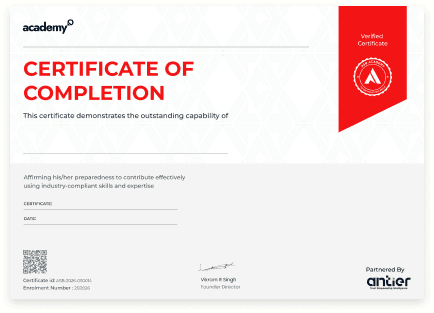
Upon successful participation, you will receive an official Certificate of Participation from ASB Academy, recognising your attendance and engagement in the Workshop in Office Automation. The certificate reflects your initiative to strengthen essential digital productivity and workplace skills.
Frequently Asked Questions
Yes. The workshop is designed for beginners and introduces office tools through simple explanations and practical demonstrations.
No. Basic familiarity with using a computer is enough to attend.
The workshop may introduce Microsoft Word, Excel, PowerPoint, Outlook, Google Workspace, Canva, and selected PDF tools.
Yes. The workshop includes an introduction to common formulas, calculations, and data organisation.
Yes. You will see how professional letters, reports, tables, and other documents are structured and formatted.
A laptop is recommended for the best learning experience. Online participants should also have a stable internet connection.
The workshop includes live demonstrations and interactive exercises. Participants may also practise selected tasks under the trainer's guidance, depending on the session format.
Yes. The workshop is suitable for students, job seekers, professionals, educators, entrepreneurs, and beginners.
Yes. Every participant who attends the workshop will receive a Certificate of Participation.
Click the Register Now button, complete the registration form, and you will receive confirmation with the workshop details.
Start Your Journey Towards Smarter Workflows
Office Automation helps you complete tasks faster, organise information efficiently, and improve workplace productivity. Join ASB Academy's Office Automation Workshop to learn practical skills in documents, spreadsheets, presentations, email, cloud collaboration, and productivity tools. Build confidence with essential digital skills for academic and professional success.
Register Now
We are Here to Help You Succeed
Do you have a question about a course or your future?
Just send us a message! Our team is ready to guide you and give you everything you need to become an expert.