
Work Smarter. Not Harder.
Build practical Microsoft 365 Copilot skills for everyday productivity. Learn how Microsoft 365 Copilot helps you write documents, analyze data, create presentations, and manage everyday tasks more efficiently.
Start Your Copilot Journey



Duration
1 Week

Learning Mode
Online • Offline • Hybrid

Course Type
Skill Development

Certification
ASB Academy Certified
Your AI Assistant for Everyday Work
Microsoft 365 Copilot is an AI assistant built into Microsoft 365 applications such as Word, Excel, PowerPoint, Outlook, and Teams. It helps you draft content, analyze information, summarize conversations, and create presentations using natural language.
Why Learn Microsoft 365 Copilot?
Discover how Microsoft 365 Copilot helps simplify everyday work across the Microsoft 365 applications you already use.
It helps you draft documents, reports, and emails in Word and Outlook, turn ideas into structured presentations in PowerPoint, analyze spreadsheets and generate formulas in Excel, and review meeting notes and email threads faster in Outlook and Teams.

Work Smarter With AI
Learn by Doing
Practice every concept through guided workplace activities.
Real Workplace Scenarios
Apply Copilot across documents, spreadsheets, presentations, meetings, and email communication.
Practical AI Skills
Learn how to write better prompts and use Copilot effectively across Microsoft 365 applications.
Capstone Project
Complete a practical business project that combines everything you've learned.
Your Learning Journey
Develop practical Microsoft 365 Copilot skills through a structured, step-by-step learning experience.
Getting Started with Microsoft 365 Copilot
Explore the interface, understand Copilot's capabilities, and learn how it works across Microsoft 365 applications..
Writing & Communication
Create documents, emails, summaries, and reports using Word and Outlook..
Presentations with PowerPoint
Develop presentations, organize ideas, and improve slide content using Copilot..
Data Analysis with Excel
Analyze spreadsheets, generate formulas, identify trends, and summarize data using natural language..
Collaboration with Teams
Use Copilot to summarize meetings, organize discussions, and improve team collaboration..
Capstone Project
Complete a practical workplace project by creating documents, presentations, and spreadsheets using Microsoft 365 Copilot..
Do More With Less Effort
Build practical Microsoft 365 Copilot skills you can apply in everyday work.
- Professional Writing: Create documents, reports, emails, and summaries more efficiently.
- Data Analysis: Analyze spreadsheets, generate formulas, and identify insights using Excel.
- Presentation Creation: Develop structured presentations using Microsoft PowerPoint.
- Workplace Collaboration: Summarize meetings, organize discussions, and manage communication across Microsoft Teams and Outlook.
Designed for Modern Professionals
Apply Your Learning
Create a complete business proposal using Microsoft 365 Copilot:
Prepare a Report in Word
Build a Presentation in PowerPoint
Create a Budget Spreadsheet in Excel
Assemble a Complete Business Proposal
Validate Your Productivity
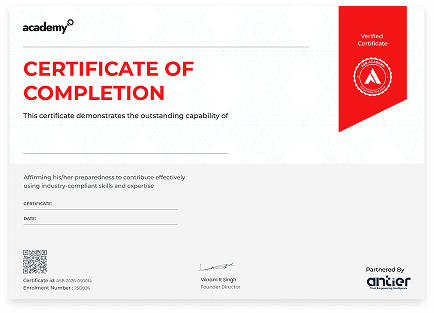
Earn the ASB Academy Certificate upon successfully completing the Microsoft 365 Copilot Skill Course and demonstrate your ability to use AI-powered productivity tools across Microsoft 365 applications.
Frequently Asked Questions
No, if you can type a text message, you can use Copilot.
Yes. The skills you learn in Word can help simplify document creation and everyday writing tasks.
You will need access to a Microsoft 365 account with Copilot enabled. The course includes guidance on getting started.
Work Smarter With Microsoft 365 Copilot.
Build practical Microsoft 365 Copilot skills to simplify everyday work and improve productivity.
Start Learning
We are Here to Help You Succeed
Do you have a question about a course or your future?
Just send us a message! Our team is ready to guide you and give you everything you need to become an expert.